Migrating from On-Premise to AWS Without Downtime: A Small Team's Field Guide
Topics: AWS, cloud migration, infrastructure, zero-downtime cutover
Tom Wade
9/30/20256 min read
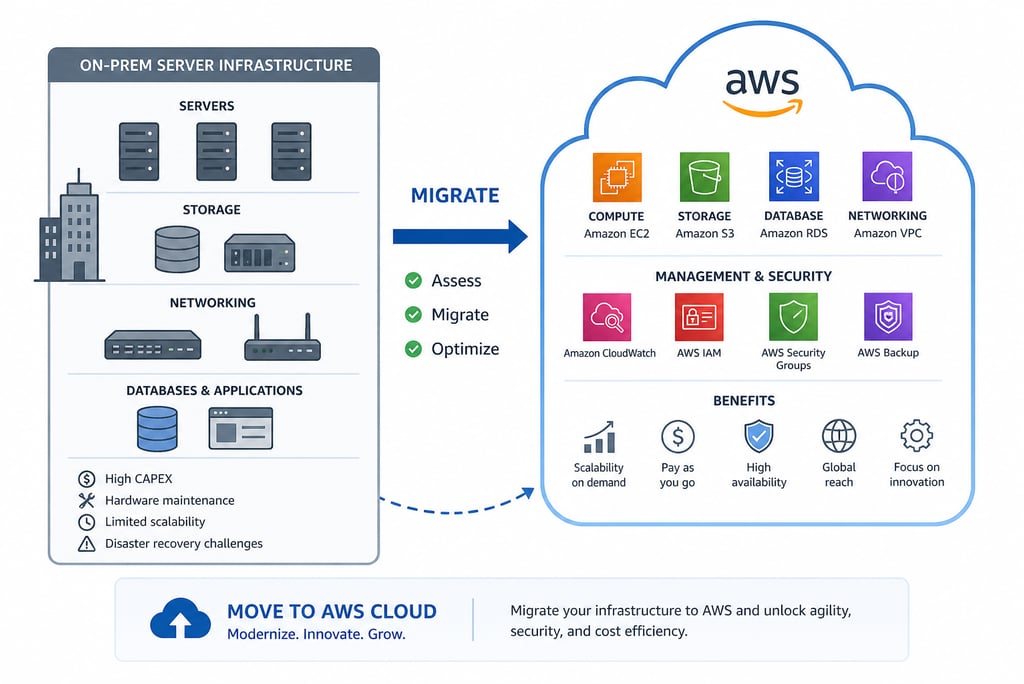
Most cloud migration stories you read on the internet come from companies with 50-person platform teams and a year-long project plan. This one's different: a small engineering team migrating an entire production stack from on-premise to AWS, supporting both internal tooling and a customer-facing web portal, with a hard requirement that customers couldn't lose service during the cutover. Here's what we moved (EC2, RDS, S3, VPC, security groups), the architectural decisions I helped make along the way, the cutover plan that actually delivered zero downtime, and a few things I'd do differently next time — including the question I get asked most: why didn't we use Terraform?
The starting state
Before the migration, we had what most small hardware-software companies have: a server room with physical hardware, a hand-tuned Linux configuration, MySQL running on bare metal, and operational tribal knowledge accumulated over years. It worked. It had been working for a long time. The pressure to migrate came from a few directions at once: the on-premise hardware was approaching end-of-life, customer growth was making redundancy and availability matter more than they used to, and the operational overhead of running our own infrastructure was eating engineering time we needed for product work.
I joined the engineering team during the period when the migration was being scoped. I'm not going to claim I led the entire effort — the architectural decisions were made collaboratively across the team, with senior team members owning the bigger calls. But I led significant portions of the work, particularly on the database, application server, and storage migration, and I was responsible for executing the production cutover. What follows is what I learned from those parts of the work.
What we moved
The migration touched four main service categories, with associated networking glue:
EC2 for application servers. Our Django application, internal tooling, and supporting services all moved from on-prem Linux hosts to EC2 instances. We chose general-purpose instances initially with a plan to right-size based on production observation; the alternative (over-provisioning to match on-prem) felt like burning money for no reason.
RDS for the relational database. MySQL was the heart of the system — customer data, sensor readings, alert configurations, audit records. RDS gave us managed backups, automated patching, point-in-time recovery, and a multi-AZ option for redundancy. The transition from "someone on the team has to remember to run mysqldump" to "AWS handles this" was one of the most quality-of-life improvements of the entire migration.
S3 for object storage. Documents, exported reports, customer assets, and a growing pile of historical data that didn't need to be in a relational database. S3 gave us cheap, durable, infinite-scale storage with reasonable security controls. The data we moved here had been accumulating on local disks for years; getting it into S3 was both a migration and a long-overdue cleanup.
VPC and security groups for networking. Designing the network topology was where I learned the most. Public subnets for load balancers, private subnets for application servers, even-more-private subnets for the database. Security groups acting as instance-level firewalls. Routing tables ensuring traffic flowed where we wanted it to. The mental model is straightforward; the practice of getting it exactly right is fiddly and consequential.
Architectural decisions I helped make
A few of the design choices that mattered most:
We chose to migrate the database to RDS rather than self-managing MySQL on EC2. The RDS pricing premium was meaningful, but for a team our size, the ops burden of self-managing a database (backups, patching, replication, failover) was higher than the premium. RDS turned out to be the right call — we have spent essentially zero engineer-hours on database operations since the migration, which we previously spent quite a few of.
We chose to use the AWS Console rather than infrastructure-as-code for the migration itself. This is the decision I get asked about most, and the honest answer is: for a one-time migration of a known-shape system done by a small team, the overhead of writing and maintaining Terraform or CloudFormation didn't pay off. The Console gave us speed and clarity at the cost of repeatability — which is a fine tradeoff for an event you do once. I would absolutely use IaC for ongoing operations and for any future migration of similar scope; the next time you do this, the inputs are different and the math changes.
We chose to do the migration in stages rather than as a single big cutover. Internal tooling first, then non-customer-facing services, then — last and most carefully — the customer-facing portal. Doing it this way meant we had time to learn AWS's quirks on lower-stakes systems before betting on customer service.
The zero-downtime cutover
The customer-facing portal cutover is the one people ask about. Customers were actively using the system; we couldn't take it down for maintenance. The plan we executed had a few key elements:
First, we set up the AWS environment fully provisioned and tested, running in parallel with on-prem. The new system pulled from a replicated copy of production data, kept in sync with the source database. We tested the new environment against this replicated data extensively — functional tests, load tests, end-to-end customer workflows — before any customer traffic touched it.
Second, we shortened DNS TTLs on customer-facing URLs days in advance. The DNS layer is the seam where you can switch traffic from old to new infrastructure with the granularity you need for a controlled cutover. With low TTLs, when we eventually flipped DNS, traffic moved over within minutes rather than hours.
Third, we ran a final database synchronization in a tightly-scoped maintenance window where we briefly froze writes on the source, replicated the last few minutes of changes to the target, validated the data, and then flipped DNS. From the customer's perspective, the system was simply continuously available; the brief write freeze was short enough that it appeared as a tiny latency blip rather than an outage.
Fourth, we kept the on-prem environment running and ready to receive traffic for several days after cutover. If something went wrong on AWS that we couldn't debug fast enough, flipping DNS back was an option. We didn't end up needing it, but the option mattered for confidence going into the cutover.
What went well
The cutover itself worked. Customers didn't lose service. The new environment was stable and observable in ways the old one wasn't. The operational burden dropped significantly within the first month, which was the whole point. New features became easier to ship because we weren't fighting infrastructure. Pricing settled at roughly what we'd estimated, which is a small thing but worth saying — cloud bills tend to grow, and ours has stayed reasonable because we paid attention to right-sizing as we went.
What went wrong (or could have)
A few things I learned the hard way:
Security groups are unforgiving. An incorrect rule doesn't fail loudly — it just silently blocks traffic, often in ways that look exactly like an application bug. Half the time I spent debugging early issues post-cutover turned out to be security-group misconfiguration. Lesson: be explicit, document the model, and test connectivity carefully on every path.
Cost monitoring matters from day one. AWS bills are surprisingly easy to inflate without realizing it — forgotten test resources, oversized instances, data-transfer charges between availability zones. Set up billing alerts before you start, not after the surprise.
The fact that we did the migration through the Console means I do not have a Terraform state file capturing the resulting environment. If we had a catastrophic AWS failure tomorrow that required rebuilding the environment from scratch, we'd be reconstructing it from documentation and screenshots. That's a real gap. I'd close it now if it weren't more expensive than the residual risk warrants — but it's a debt to be aware of.
What I'd do differently
I'd commit to infrastructure-as-code earlier in the journey. Not for the migration itself, but for the post-migration steady state — the moment you're running production on AWS, you want a reproducible source of truth for the environment. The cost of writing Terraform for a known environment after the fact is much lower than writing it during a migration, but doing it earlier than “never” would still have been the right call.
I'd also invest in observability earlier. CloudWatch is free, and the visibility it gives you into what's actually happening in your environment is the thing that lets you debug fast. The first weeks after cutover were harder than they needed to be because we hadn't fully wired up dashboards and alerts yet.
The quiet lesson
The biggest takeaway from this work isn't a technical one. It's about scope. A migration like this is large enough to feel intimidating but small enough that a small team can actually do it well, and the way you do it well is to not try to do everything at once. Pick a piece, move it, validate it, learn from it, then pick the next piece. The customer-facing cutover at the end was straightforward because we'd already moved a dozen smaller things and learned how AWS worked along the way. By the time we got to the last and most important piece, it wasn't actually the scary part.