Role-Based Access Control (RBAC) for SHM Applications
Implementing flexible organization-scoped permissions in a structural health monitoring web portal.
8/4/20254 min read
An SHM web portal without role-based access control is like a building without lockable doors: it works fine until it doesn't, and the moment it doesn't, you wish you'd done it the right way to begin with. This is a short post about adding role-based access control to a customer-facing SHM portal, the Resensys WebScope — the roles I introduced (Admin, Operator, Viewer), the things they actually control, and the second-order benefits I didn't expect when I started, including a meaningful reduction in database bloat from per-user configuration drift.
The starting point
The original portal had authentication — every user had a login — but it didn't have meaningful authorization. Once you were in, you could see and modify whatever your organization had access to. For small customers with one or two users, this was fine. For larger customers — DOTs, industrial operators, anyone with multiple sites and multiple internal teams — it was a problem in waiting.
The problem manifested in predictable ways. A junior staffer would change a threshold value that a senior engineer had carefully tuned. A regional team would see deployments belonging to a different region and get confused about which alerts were theirs. A read-only auditor would have full edit privileges they didn't need and didn't want, which is a category of risk in itself. None of this had caused a serious incident, but the trajectory was clear: as customers got bigger, the absence of access control was going to become an actual liability.
Three roles, scoped by site
I introduced three roles, deliberately kept simple. More roles means more conceptual overhead for customer admins, and the value drops off fast after the first three.
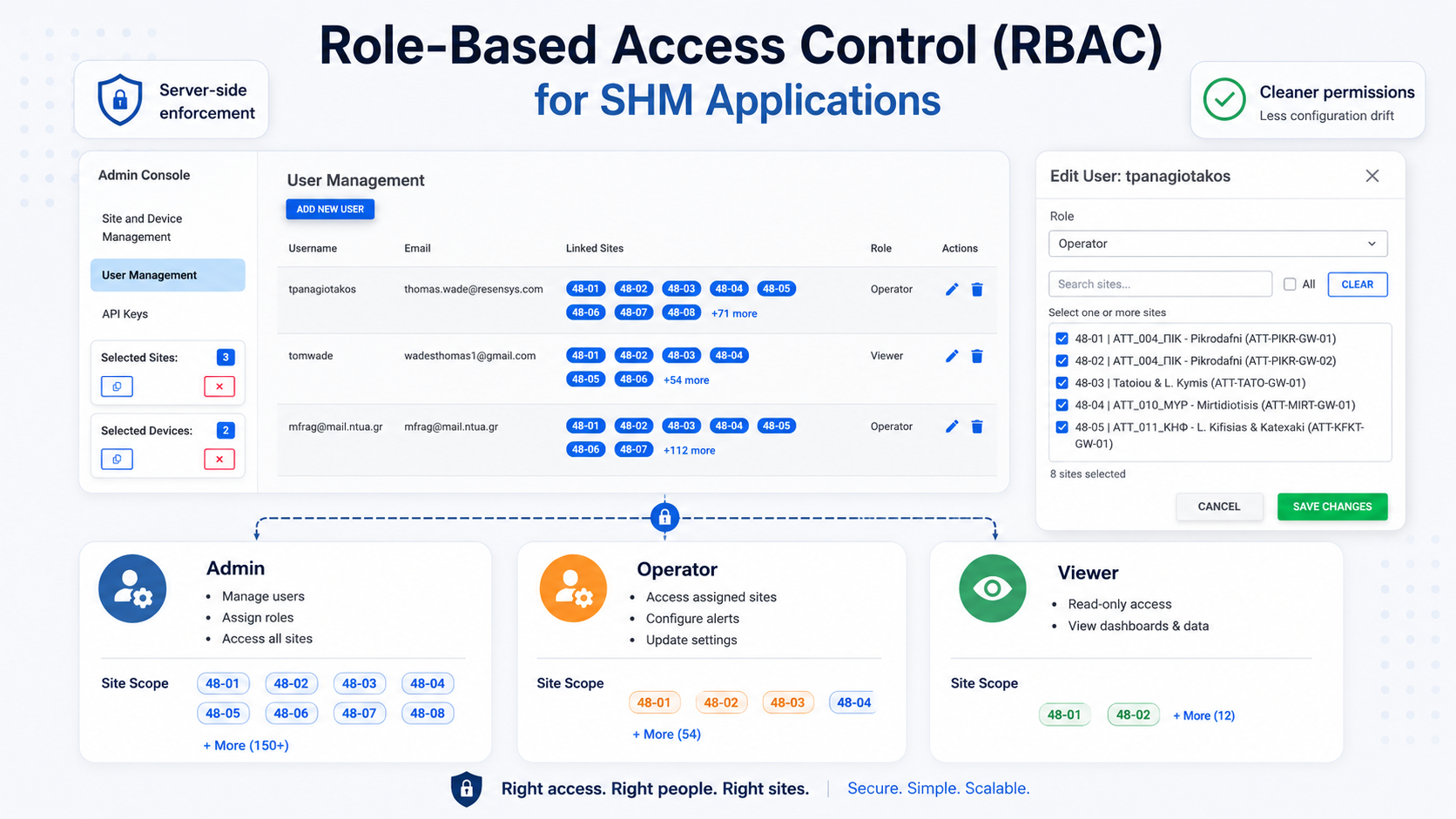
Admin. Can see and modify everything within the customer's organization. Can create new users, assign them roles, and scope their access. Typically the customer's IT contact or a senior engineer.
Operator. Can see and modify the deployments they've been granted access to. Can configure alert thresholds, acknowledge alerts, edit device-level configuration. Cannot create users or change roles.
Viewer. Can see the deployments they've been granted access to. Cannot modify anything. Useful for auditors, executives, contractors, or anyone who needs to look without needing to touch.
Crucially, every role is scoped by site. An Admin can subdivide their organization's deployments and grant a given user (Operator or Viewer) access to a specific subset. A regional engineer at a national customer might be an Operator on the deployments in their region and have no access to the rest. This is the access-control granularity that customers with real organizational structure actually need.
Where the access control lives
The implementation puts authorization at the API and ORM layer, not at the front-end. Every query that loads sensor data, every endpoint that updates configuration, every API call from the customer's own systems — all of them apply the access-control filter on the server side, before any data is returned. The front-end just renders what the server allows.
I'm being deliberate about this because the temptation, when you're retrofitting access control onto an existing app, is to hide things in the UI and call it done. Hiding things in the UI is not access control. It's UX. A user with a browser developer console can call any endpoint the application exposes, regardless of whether the UI showed a button for it. Real access control has to live where the data does.
Practically, this meant going through every endpoint and every ORM query and adding the access-control filter as a first-class concern. It was tedious. It was also where the actual security of the feature lives, so it was worth doing carefully.
The unexpected benefit: less configuration drift
I didn't introduce roles to clean up the database. I introduced roles for security and customer manageability. But a side effect emerged that's worth mentioning.
Before the role split, anyone in a customer organization could change anything — alert thresholds, calibration coefficients, dashboard configurations. The result was a slow accumulation of per-user, per-session changes that nobody owned and nobody was responsible for cleaning up. Person A would change a threshold. Person B would change it back. Person C would adjust calibration coefficients to match a personal preference. Each change wrote a row. The tables grew with configuration that didn't reflect anyone's considered position; it reflected the historical churn of an unscoped permission model.
Once roles existed and most users were Viewers or scoped Operators, the rate of casual configuration changes dropped substantially. The configuration tables stopped growing as fast. The configurations that did exist were more deliberate — written by people who actually owned them — which made the data downstream cleaner. Storage cost is a small thing at our scale, but the data-quality improvement was real.
What I'd tell anyone retrofitting access control
Three things, briefly:
First, do it sooner than you think you need to. The cost of adding access control to an existing application scales roughly with the number of endpoints and queries, and that number only grows. The version of this work I did took longer than it would have if I'd built RBAC into the original schema; the version a year later would have taken longer still.
Second, do it at the data layer, not the UI. UI-based hiding looks like access control and isn't.
Third, keep the role count small. Three roles cover almost every customer's organizational structure, and the marginal value of a fourth or fifth role is much lower than the conceptual cost it imposes on customer admins. If a customer is asking for a more elaborate role model than three, the right next move is usually scoped permissions within the existing roles, not new role types.
Closing
Access control is one of those features that, when it's working, is invisible. Customers stop asking for it because they have it. Junior staffers don't accidentally change senior engineers' configurations because they can't. Auditors get their read-only logins and don't have to worry about touching the wrong button. The day-to-day result is just calmer; nothing dramatic happens, which is exactly the point.
For an SHM application — one whose entire job is to be a trustworthy source of information about real-world infrastructure — calmer is worth a lot. Access control is part of how you earn the trust the product depends on.